Hey guys, let’s talk about something we’ve all definitely done at least once: yanking a computer cable to move your setup around, or shoving your desk back just a little too fast, and watching that sharp, tight kink form right where the cable meets your laptop, monitor, or gaming PC. I’m the go-to guy for all things computer cables (you can call me J, since that’s what everyone at our shop does), and I get at least three DMs a week asking if those sharp bends are actually a big deal. Spoiler: It’s not just a “it’ll work this time” thing—there’s actual science behind it, and as a cable supplier, I see way too many customers come back with fried cables that they swears were “fine until that one bend.” Computer Cables
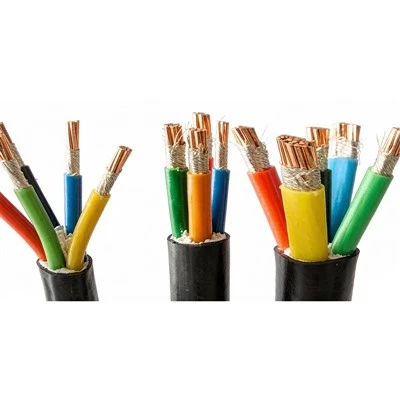
First, let’s break down what a computer cable is, because not all of ‘em are made the same. I’ve got stacks of HDMI, USB-C, Ethernet, and power cables in my warehouse, and each one has a different internal structure. Your average USB-A cable, for example, has four tiny copper wires wrapped in a plastic core, right? Those wires are super thin—like, thinner than a strand of hair in some cases—and they’re twisted together to handle signal or power. Now, a sharp bend (we’re talking less than, say, 15 millimeters of radius, roughly the width of a dime) crushes that core in half. The copper wires don’t just “bend” like a paper clip—they crack, or even snap completely. I once had a kid bring in a USB-C cable that he’d bent 90 degrees to tuck his laptop under his bed; when I peeled back the outer jacket, half the internal wires were broken. No wonder his phone wouldn’t charge.
Wait, but what about thicker cables, like the ones for gaming monitors or high-speed Ethernet? Same problem, just on a bigger scale. Those have thicker shielding and more internal wires, so a sharp kink can damage the shielding too. Shielding is what keeps signal interference away—if that’s messed up, you get fuzzy monitor displays, laggy online games, or Ethernet that cuts out mid-Zoom. I had a guy last month who blamed his 4K monitor’s pixelation on his old graphics card, until I pointed out the sharp bend in his HDMI cable right at the monitor port. Fixed the bend, problem gone in 10 seconds.
Now, let’s get into the myth I hear all the time: “Oh, it’s just a temporary bend, it’ll straighten out!” Nope, not with most cables. The outer jacket is flexible, but the internal wiring isn’t memory foam—it doesn’t bounce back. If you make a sharp bend, that’s a permanent weak spot, even if you don’t notice it right away. It might work for a week, a month, even a year… but then one day, you plug it in, and nothing happens. Or it works when it’s straight, but the second you nudge it, the screen goes black. That’s the broken wire waking up from that sharp kink.
But hold on—this doesn’t mean you have to walk on eggshells around your cables, either. I’m not here to tell you to never adjust your desk or move your PC. There’s a big difference between a sharp, tight bend and a gentle curve. What’s the safe bend radius, you ask? For most standard computer cables, it’s around 30mm (a little bigger than a quarter) for regular use, and even more for high-speed cables like USB 3.2 or Thunderbolt. I always tell my customers to lay cables along the edge of their desk, or use a cable clip to keep them curved loose, not crammed into a corner. Pro tip: If your cable is already showing a little fray at the bend, replace it before it dies for good. I’ve seen too many people try to tape a frayed cable, and that just leads to more issues later.
Wait, what about power cables? They’re thicker, right? Yeah, but they’re not invincible. A sharp bend in a power cable can fray the outer jacket so much that the internal wiring is exposed. That’s a fire hazard, no joke. I had a customer call me last year panicking because his power cable was kinked behind his server, and he smelled something burning. We got him a new one fast, but it totally could’ve been worse. Never ignore a sharp kink in a power cable—those are carrying electricity, not just data.
Now, as a cable supplier, I have to be honest with you: not all cables are made equal. Cheap, no-name cables you pick up at the gas station? Those have thinner internal wiring and worse shielding, so they break way easier when bent sharply. I always tell my customers to invest in a quality cable from a reputable supplier, like ours, because the internal components are built to handle more bends before they fail. We test every single cable we sell for bend resistance—no cutting corners, no cheap copper that cracks at the first sharp kink.
I also get the “I can’t be bothered to rearrange my whole desk” argument. I get it, I’ve got a messy setup too. So here’s a quick hack: use cable management products. Velcro ties, cable clips, even those little adhesive hooks that stick to your desk—they keep cables curved gently, no sharp bends. I keep a pack of these in my warehouse and give ‘em out to every customer who buys a cable from me, because it’s a cheap fix that saves you from having to replace a $20-$50 cable every few months.
Let’s do a quick real-life example. Last week, a regular customer came in with three dead HDMI cables. Turns out, he’d been shoving his desk back to vacuum, and every time he did, the cables got crammed into the gap between the desk and the wall, making sharp, tight bends. All three had broken internal wires at the kink point. I replaced ‘em with our heavy-duty HDMI cables, threw in a pack of cable clips, and told him to clip the cables to the back of his desk so they curved loose instead of being crushed. He texted me two days later saying it worked, and he hadn’t had any issues. That’s the stuff that makes this job worth it—helping people avoid unnecessary headaches.
Another thing people miss: the bend at the connector is the worst spot. That’s where the cable meets the port, and that’s where most of the stress is. Even if you have a cable that’s bend-resistant, a sharp kink right at the connector will still cause problems. I always tell people to grip the connector itself when plugging or unplugging, not the cable. Pulling the cable instead of the connector is like pulling a weed by the stem instead of the roots—you’re way more likely to break something.
Wait, what about USB-C cables that advertise “10,000 bends”? Yeah, those are real, but that number is for gentle bends, not sharp ones. I’ve seen those bend-tested cables fail after a single 90-degree sharp kink. The manufacturers test them with gradual curves, not tight, sharp bends, so don’t let that marketing number fool you. It’s a good selling point, but it’s not a free pass to abuse your cables.
Let’s wrap this up, because I know you’re tired of hearing me talk about cables. So, is it okay to bend computer cables sharply? Short answer: No, it’s not a good idea. It damages the internal wiring and shielding, leads to signal loss, lag, dead cables, even fire hazards for power cables. Long answer: It depends on the cable, the bend, and how often you do it—but even a single sharp kink can create a weak spot that’ll fail down the line. But you don’t have to be perfect, just be mindful. Bend ‘em gently, keep ‘em clear of tight gaps, use cable clips, and grab the connector when you plug in.
If you’ve got more questions about cable care, or you’re in the market for quality cables that can handle the daily wear of a busy setup, hit us up to chat about your needs. We’ve got all types—HDMI, USB-C, Ethernet, power, whatever you need—built to last. Don’t be the guy who has to replace three cables a month because of sharp bends. Let’s get you set up right.
Control Cables References
- National Institute of Standards and Technology (NIST). (2021). Failure Mechanisms in Copper-Based Data and Power Cables.
- IEEE Computer Society. (2019). Guide to Cable Installation and Maintenance for Consumer Electronics.
- Underwriters Laboratories (UL). (2022). Safety Standards for Power and Data Cable Integrity.
Anhui Yuantong Cable Co., Ltd.
As one of the most professional computer cables manufacturers and suppliers in China, we offer a wide range of cables with superior quality. Please feel free to wholesale bulk customized computer cables from our factory. Also, pricelist is available.
Address: Yongfeng Industrial Park, Tianchang City, Anhui Province
E-mail: ahytcable@126.com
WebSite: https://www.yuantongcable.net/
